 4309550ca0
* Remove template in favor of official samples

* Fixed a variable name copy pasta mistake

line 35 was _database.GetData() instead of DBService.GetData()

* Experimental theme change

* Change paragraph, code, heading fonts
* Widen viewport

* Update DocFX.Plugins.LastModified v1.2.3

* Exclude Discord.API in docs

* Add remarks for SocketReaction properties

* Add examples for BaseSocketClient.Events

* Add additional clarification for some methods

* Move IUser and IGuildChannel examples

* Clarify several guides samples with notes

- Reword TypeReader comment to avoid giving the idea that the sample itself is "obsolete"
- Remove CommandException logging comment regarding C#7.0 as the version is now the standard across VS2017 and up
- Remove suggestion about handling result in command handler since it is now advised to use CommandExecuted instead
+ Add additional comment to clarify ctor for DI setup

* Add/migrate code examples

* Incorporate material design theme

License @ https://github.com/ovasquez

* Update installation and nightly guide

* Fix improper indentations made obvious by the widen viewport
* Fix minor grammar issues
+ Add installation for nightly build using dotnet CLI

* Fix nav level indentation

* Revise "Your First Bot" article

* Merge some paragraphs to avoid clutter while keeping readability
* Reword the use of command framework
+ Add additional warning/note about environment variable

* Add additional indent level

* Fix indentation text warping

* Remove connections sample

* Update logging sample

Remove redundant part of the sample

* Remove mention of RPC

* Remove misleading section about commands

- Remove command sample from complete snippet
* Revise "Your First Bot" command paragraphs
* Change wording to hint devs that additional command parser packages may be available, as more and more begin to crop up

* Update themes

* Add XML docs contribution guidelines


Update guidelines

* Update CommandExecuted remarks

* Fix precondition remarks typo
no one saw that ok

* Fix permission sample in docfx

* Fix IMessageChannel samples

* Update docs/_template/light-dark-theme/styles/docfx.vendor.minify.css

Co-Authored-By: Still34 <341464@gmail.com>

* Update docs/_template/light-dark-theme/styles/material.css

Co-Authored-By: Still34 <341464@gmail.com>

* Update docs/_template/light-dark-theme/styles/material.css

Co-Authored-By: Still34 <341464@gmail.com>
3.2 KiB
uid, title
| uid | title |
|---|---|
| Guides.GettingStarted.Installation.Nightlies | Installing Nightly Build |
Installing Discord.Net Nightly Build
Before Discord.Net pushes a new set of features into the stable version, we use nightly builds to test the features with the community for an extensive period of time. Each nightly build is compiled by AppVeyor whenever a new commit is made and will be pushed to our MyGet feed.
Important
Although nightlies are generally stable and have more features and bug fixes than the current stable build on NuGet, there will be breaking changes during the development or breaking bugs; these bugs are usually fixed as soon as they are discovered, but you should still be aware of that.
Installing with MyGet (Recommended)
MyGet is typically used by many development teams to publish their latest pre-release packages before the features are finalized and pushed to NuGet.
The following is the feed link of Discord.Net,
https://www.myget.org/F/discord-net/api/v3/index.json
Depending on which IDE you use, there are many different ways of adding the feed to your package source.
Using Visual Studio
-
Go to
Tools>NuGet Package Manager>Package Manager Settings
-
Go to
Package Sources
-
Click on the add icon
-
Fill in the desired name and source as shown below and hit
Update


Note
Remember to tick the
Include pre-releasecheckbox to see the nightly builds!

Using dotnet CLI
- Launch your terminal
- Navigate to where your
*.csprojis located - Type
dotnet add package Discord.Net --source https://www.myget.org/F/discord-net/api/v3/index.json
Using Local NuGet.Config
If you plan on deploying your bot or developing outside of Visual Studio, you will need to create a local NuGet configuration file for your project.
To do this, create a file named NuGet.Config alongside the root of
your application, where the project is located.
Paste the following snippets into this configuration file, adding any additional feeds if necessary.
[!codeNuGet Configuration]
After which, you may install the packages by directly modifying the
project file and specifying a version, or by using
the Package Manager Console
(Install-Package Discord.Net -IncludePrerelease).
Installing from AppVeyor Artifacts
As mentioned in the first paragraph, we utilize AppVeyor to perform automated tests and publish the new build. During the publishing process, we also upload the NuGet packages onto AppVeyor's Artifact collection.
The latest build status can be found within our AppVeyor project.
- In the project, you may find our latest build including the
aforementioned artifacts.
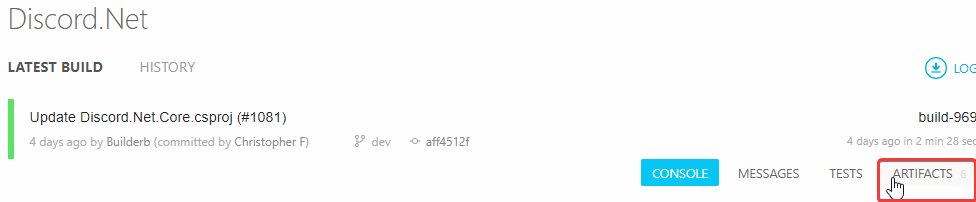
- In the artifacts collection, you should see the latest packages
packed in
*.nupkgform which you could download from and use.

