 22d79c1004
* Improve the Command Service documentation

The following changes have been added to this PR:
•	Fix minor grammatical errors.
•	Capitalize terms such as Commands, Modules and such, as the context is specific to the lib.
•	Wrap methods and properties in code blocks.

The docs page currently has several issues that remains to be fixed.

1.
```md
>[!WARNING]
>This article is out of date and has not been rewritten yet.
Information is not guaranteed to be accurate.
```

The docs doesn't necessarily seem "out of date" as the warning claims. The basics seem pretty relevant to the latest version of the lib.

2.
>“To manually load a module, invoke [CommandService.AddModuleAsync], by passing in the generic type of your module and optionally, a dependency map.”

The latter part of the sentence seems off. Where should the user pass the dependency map to? It seems to suggest that `AddModuleAsync` has an argument to pass the dependency to. If it is referring to `AddModuleAsync(Type type)`, then I feel like it should be clarified here - or perhaps change the wording of the sentence.

3.
>“First, you need to create an @System.IServiceProvider You may create your own IServiceProvider if you wish.”

Any mention of @System.IServiceProvider is currently broken on the docs.

4.
>“Submodules are Modules that reside within another one. Typically, submodules are used to create nested groups (although not required to create nested groups).”

Clarification on the part after "although?"

5.
>“Finally, pass the map into the LoadAssembly method. Your modules will automatically be loaded with this dependency map.”

Where is this `LoadAssembly` method?

6.
```md
>[!NOTE]
>Preconditions can be applied to Modules, Groups, or Commands.
```

The docs should mention `ParameterPreconditionAttribute`'s existence.

* Update line breaks to comply with docs standard

* Change "you should..." to "instead, ..."

* Trim trailing spaces

* Change "inherits" to "inherit"

* Fix Context warning note and add ReplyAsync xref

* Fix broken xrefs

* Fix [Command Service] xref

* Fix consistency between TypeReaders and Preconditions returns

* Add missing semi-colons in ServiceProvider sample

* Change CommandContext to SocketCommandContext & change variable naming

* Cleanup TypeReader section

* Wrap [DontInject] in code block

* Fix commands docs linking in intro

* Improve Getting Started - Installation

- Fix character misalignment to comply with docs standard.
- Fix image numbering issues by moving the tooltips above some of the steps.
- Add codeblocks to search terms like `Discord.Net`.
- Remove broken `addons` reference.
- Specify `.NET 4.6.1` as `.NET Framework 4.6.1`.
- Minor cross-reference cleanup.

* Fix Getting Started - Intro

- Minor grammartical fixes.
- Wrap mentions of the methods, properties, and events in code block.
- Replace `Discord.Net` to `Discord.NET`.
- Fix steps numbering under `Creating a Discord Bot` and `Adding your bot to a server`.
- Change `Task-based Asynchronous Pattern ([TAP])` linking to mark the entire term instead.
- Change code block of `Pong!` to quotation mark instead.

* Fix cross references in Sending Voice

* Mention parameter precondition attribute

* Change `Discord.NET` to `Discord.Net` for consistency

* Wrap project names in code blocks & minor fixes in Terminology

* Change `add-ons` to `addons` for consistency

* Fix cross references in Logging

* Fix minor grammatical issues in "Working with Events"

* Missed a tilda

* Remove out-of-date warning in Commands

* Minor grammatical fixes for Entities

* Fix broken xref in Logging

* Adjust service collection sample

...according to f89aecb7bf (r141530227)

* Update Command Handler sample

- Update Main for C# 7.1.
- Inject CommandService and DiscordSocketClient into the service collection.
- Add Async suffix to asynchronous methods.

* Minor grammatical fixes in Events

* Revert 2 incorrect grammar corrections

* Revert async Main sample

* Add hardcode token notice in sample

* Fix missing method for Command Handler

* Modify module samples to use SocketCommandContext instead

* Emphasize CommandContext and SocketCommandContext

* Fix formatting for module sample

* Add SocketCommandContext for Groups sample

* Remove comma

* Fix DepMap sample formatting

* Replace [DontInject] with DontInjectAttribute with cross reference

* Remove connection logic note

There is no reason that this note should still be here since Ready event exists.

* Add a new warning message informing the users the existence of CommandService

* Make command handler private

excellent change
4.7 KiB
title
| title |
|---|
| Installing Discord.Net |
Discord.Net is distributed through the NuGet package manager, and it is recommended to use NuGet to get started.
Optionally, you may compile from source and install yourself.
Supported Platforms
Currently, Discord.Net targets .NET Standard 1.3 and offers support for .NET Standard 1.1. If your application will be targeting .NET Standard 1.1, please see the additional steps.
Since Discord.Net is built on the .NET Standard, it is also
recommended to create applications using .NET Core, though not
required. When using .NET Framework, it is suggested to target
.NET Framework 4.6.1 or higher.
Installing with NuGet
Release builds of Discord.Net 1.0 will be published to the official NuGet feed.
Development builds of Discord.Net 1.0, as well as addons (TODO) are published to our development MyGet feed.
Direct feed link: https://www.myget.org/F/discord-net/api/v3/index.json
Not sure how to add a direct feed? See how with Visual Studio or without Visual Studio.
Using Visual Studio
Tip
Don't forget to change your package source if you're installing from the developer feed. Also make sure to check "Enable Prereleases" if installing a dev build!
- Create a solution for your bot.
- In Solution Explorer, find the "Dependencies" element under your bot's project.
- Right click on "Dependencies", and select "Manage NuGet packages."
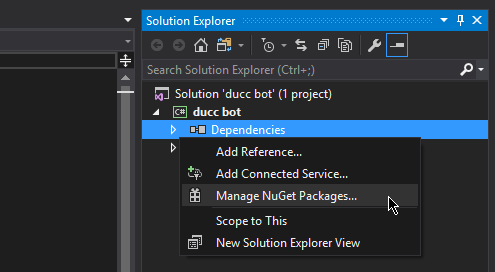
- In the "Browse" tab, search for
Discord.Net. - Install the
Discord.Netpackage.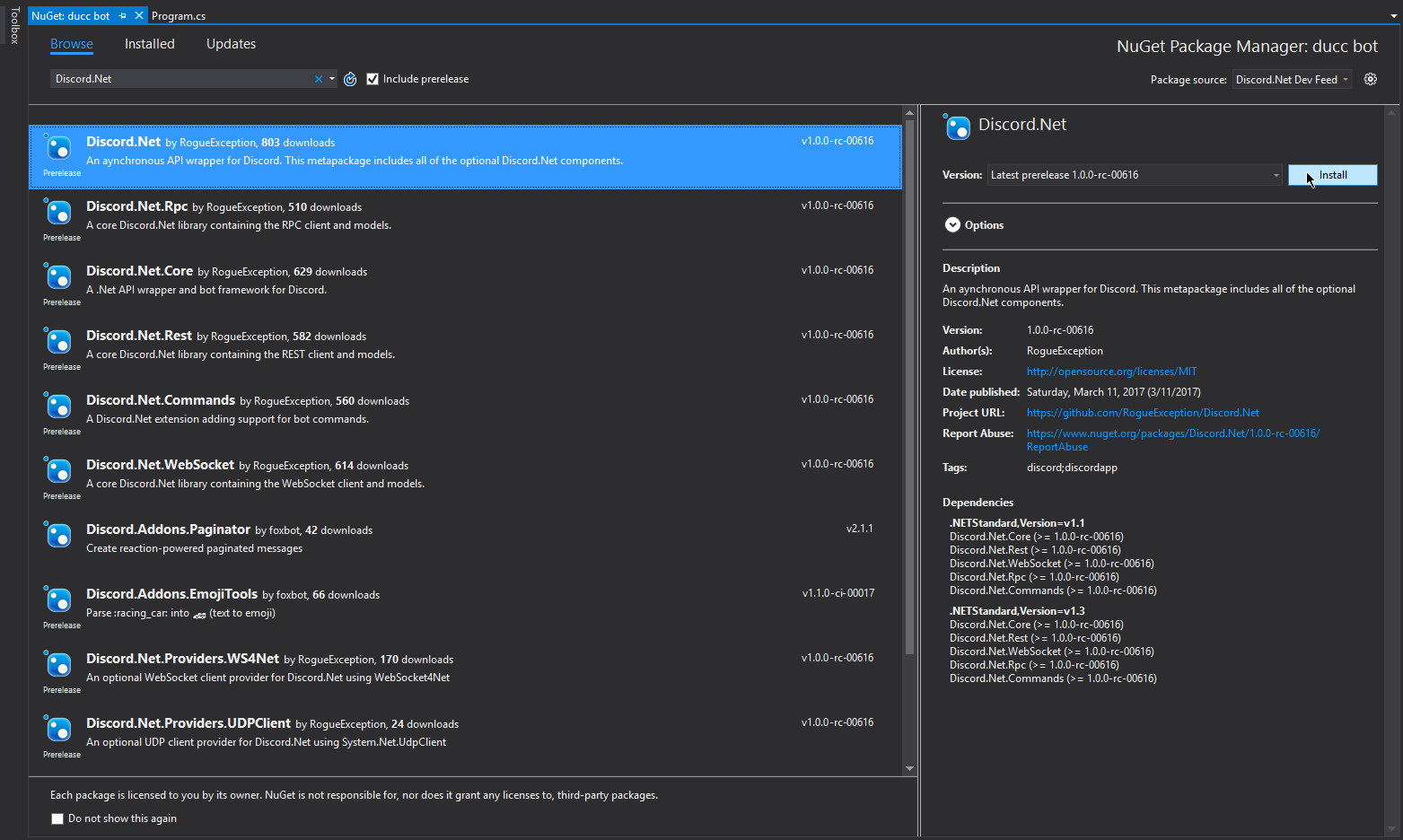


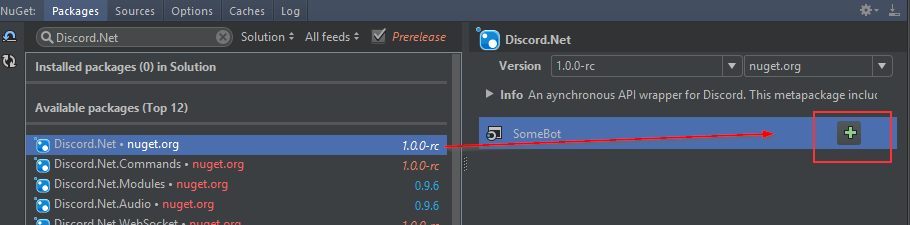
Using JetBrains Rider
Tip
Make sure to check the "Prerelease" box if installing a dev build!
- Create a new solution for your bot.
- Open the NuGet window (Tools > NuGet > Manage NuGet packages for
Solution).
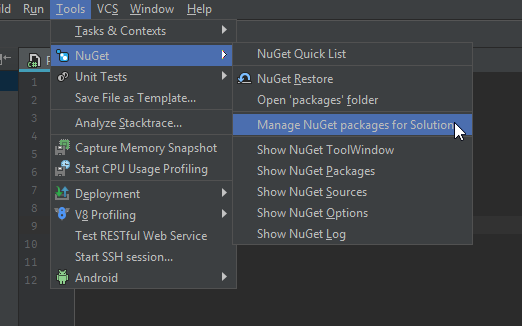
- In the "Packages" tab, search for
Discord.Net.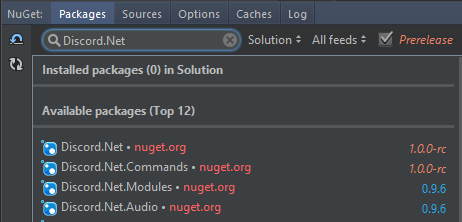
- Install by adding the package to your project.


Using Visual Studio Code
Tip
Don't forget to add the package source to a NuGet.Config file if you're installing from the developer feed.
- Create a new project for your bot.
- Add
Discord.Netto your .csproj.
[!code-xmlSample .csproj]
Compiling from Source
In order to compile Discord.Net, you require the following:
Using Visual Studio
The .NET Core and Docker (Preview) workload is required during Visual Studio installation.
Using Command Line
Additional Information
Installing on .NET Standard 1.1
For applications targeting a runtime corresponding with .NET Standard 1.1 or 1.2, the builtin WebSocket and UDP provider will not work. For applications which utilize a WebSocket connection to Discord (WebSocket or RPC), third-party provider packages will need to be installed and configured.
First, install the following packages through NuGet, or compile yourself, if you prefer:
- Discord.Net.Providers.WS4Net
- Discord.Net.Providers.UDPClient
Note that Discord.Net.Providers.UDPClient is only required if your
bot will be utilizing voice chat.
Next, you will need to configure your DiscordSocketClient to use these custom providers over the default ones.
To do this, set the WebSocketProvider and the optional
UdpSocketProvider properties on the DiscordSocketConfig that you
are passing into your client.
[!code-csharpNET Standard 1.1 Example]
Configuring NuGet without Visual Studio
If you plan on deploying your bot or developing outside of Visual Studio, you will need to create a local NuGet configuration file for your project.
To do this, create a file named nuget.config alongside the root of
your application, where the project solution is located.
Paste the following snippets into this configuration file, adding any additional feeds as necessary.
[!code-xmlNuGet Configuration]