 fd3810e9fe
* docs: adjust wording of ActivityType.Watching enum

Adjusts the xmldoc summary wording of the ActivityType.Watching enum to
fix a wording issue.

* Add D.NET Logo to Open Graph meta tags

* Update DescriptionGenerator
...And update color to suit the logo better

* Disable smooth scrolling due to user complaints

* Remove unnecessary spacing in sideaffix

* Update footer version

* Remove featherlight plugin

As it is unnecessary and can break image tags

* Adjust wordings regarding safe-handling of secrets

* Fix formatting for first bot token sample

* Add badges to homepage

* Minor wording fixes on terminal

* Update to higher quality PNG

* Add Discord.Net.Example in sln for build validation

* Clarify all instances of IAsnycEnumerable

* Clarify overridden props in SocketNewsChannel

* Add returns and params docs for SyncPermissionsAsync

* Remove/fix invalid XMLdoc strings

* Remove AppVeyor and add GitHub badge
3.3 KiB
uid, title
| uid | title |
|---|---|
| Guides.GettingStarted.Installation.Nightlies | Installing Nightly Build |
Installing Discord.Net Nightly Build
Before Discord.Net pushes a new set of features into the stable version, we use nightly builds to test the features with the community for an extensive period of time. Each nightly build is compiled by AppVeyor whenever a new commit is made and will be pushed to our MyGet feed.
Important
Although nightlies are generally stable and have more features and bug fixes than the current stable build on NuGet, there will be breaking changes during the development or breaking bugs; these bugs are usually fixed as soon as they are discovered, but you should still be aware of that.
Installing with MyGet (Recommended)
MyGet is typically used by many development teams to publish their latest pre-release packages before the features are finalized and pushed to NuGet.
The following is the feed link of Discord.Net,
https://www.myget.org/F/discord-net/api/v3/index.json
Depending on which IDE you use, there are many different ways of adding the feed to your package source.
Using Visual Studio
-
Go to
Tools>NuGet Package Manager>Package Manager Settings
-
Go to
Package Sources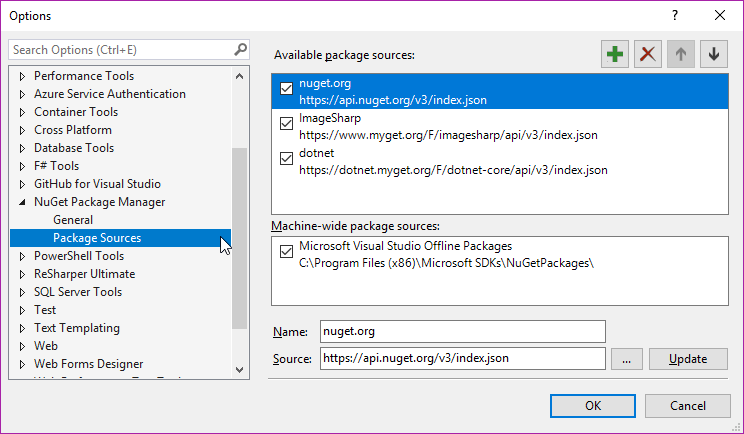
-
Click on the add icon
-
Fill in the desired name and source as shown below and hit
Update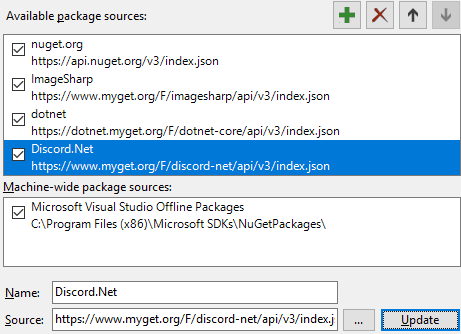


Note
Remember to tick the
Include pre-releasecheckbox to see the nightly builds!

Using dotnet CLI
- Launch a terminal of your choice
- Navigate to where your
*.csprojis located - Type
dotnet add package Discord.Net --source https://www.myget.org/F/discord-net/api/v3/index.json
Using Local NuGet.Config
If you plan on deploying your bot or developing outside of Visual Studio, you will need to create a local NuGet configuration file for your project.
To do this, create a file named NuGet.Config alongside the root of
your application, where the project is located.
Paste the following snippets into this configuration file, adding any additional feeds if necessary.
[!codeNuGet Configuration]
After which, you may install the packages by directly modifying the
project file and specifying a version, or by using
the Package Manager Console
(Install-Package Discord.Net -IncludePrerelease).
Installing from AppVeyor Artifacts
As mentioned in the first paragraph, we utilize AppVeyor to perform automated tests and publish the new build. During the publishing process, we also upload the NuGet packages onto AppVeyor's Artifact collection.
The latest build status can be found within our AppVeyor project.
- In the project, you may find our latest build including the
aforementioned artifacts.

- In the artifacts collection, you should see the latest packages
packed in
*.nupkgform which you could download from and use.

