
100 lines
5.0 KiB
Markdown
100 lines
5.0 KiB
Markdown
# Get Peace of Mind <br> with [Easy Privacy](https://safing.io/)
|
||
|
||
Portmaster is a free and open-source application firewall that does the heavy lifting for you.
|
||
Restore privacy and take back control over all your computer's network activity.
|
||
|
||
With great defaults your privacy improves without any effort. And if you want to configure and control everything down to the last detail - Portmaster has you covered too. Developed in the EU 🇪🇺, Austria.
|
||
|
||
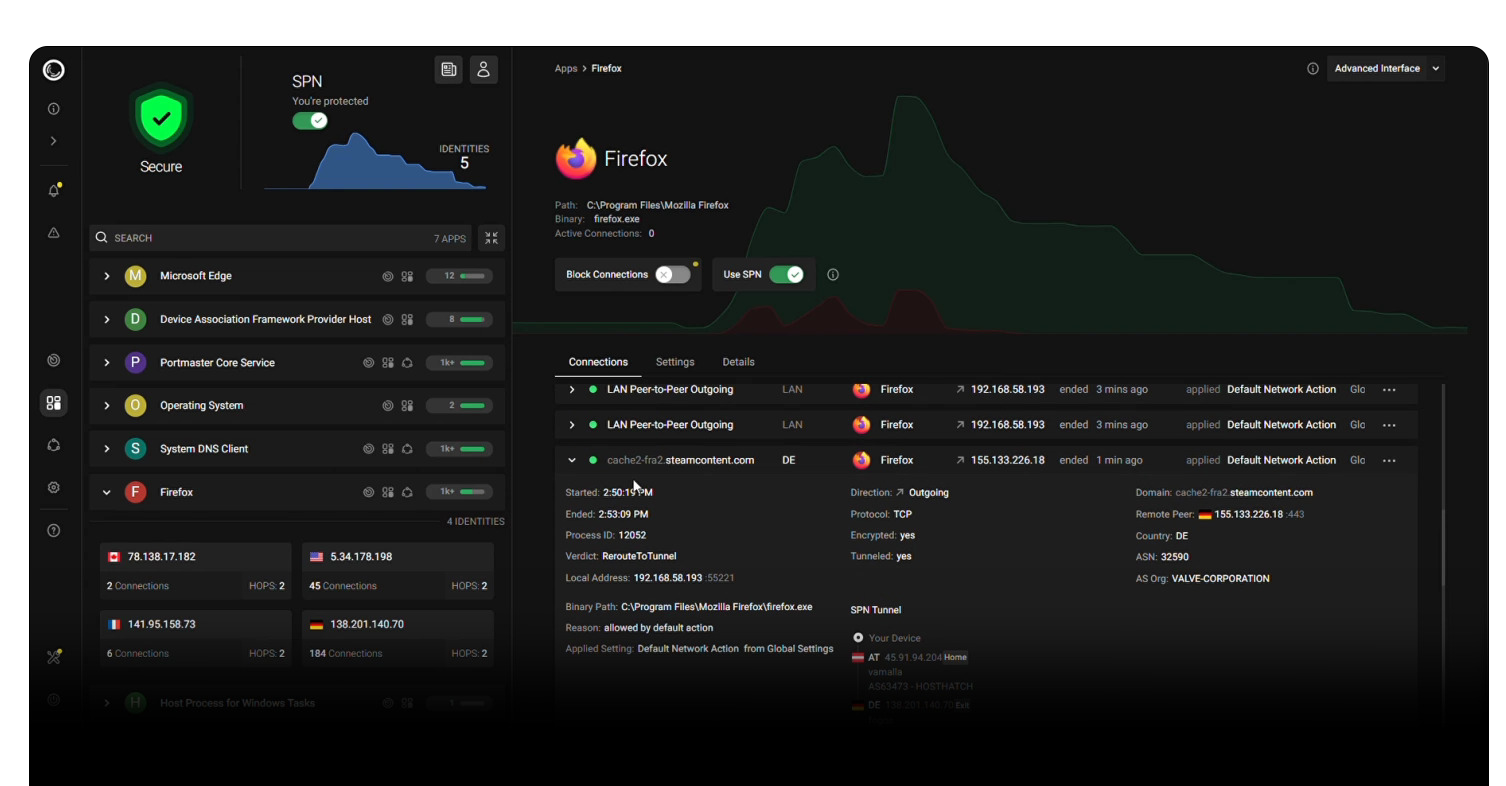
|
||
|
||
## Features
|
||
|
||
1. [Monitor All Network Activity](https://safing.io/features#monitor-all-network-activity)
|
||
2. [Automatically Block Trackers & Malware](https://safing.io/features#auto-block-trackers-and-malware)
|
||
3. [Secure Your DNS Requests by Default](https://safing.io/features#secure-dns-by-default)
|
||
4. [Create Your Own Rules](https://safing.io/features#create-your-own-rules)
|
||
5. [Set Global & per‑App Settings](https://safing.io/features#set-global-and-app-settings)
|
||
6. [FAQ](https://wiki.safing.io/en/FAQ/FrequentlyAskedQuestions)
|
||
|
||
# [Download for Free](https://safing.io/download/)
|
||
|
||
## About Safing
|
||
|
||
- [About](https://safing.io/about/)
|
||
- [Pricing](https://safing.io/pricing/)
|
||
- [Business Model](https://safing.io/business-model/)
|
||
- [Ownership](https://safing.io/ownership/)
|
||
- [Team](https://safing.io/team/)
|
||
|
||
## As Seen on:
|
||
|
||
[](https://news.itsfoss.com/portmaster-1-release/)
|
||
|
||
[](https://www.ghacks.net/2022/11/08/portmaster-1-0-released-open-source-application-firewall/)
|
||
|
||
[](https://www.youtube.com/watch?v=E8cTRhGtmcM)
|
||
|
||
[](https://lifehacker.com/the-lesser-known-apps-everyone-should-install-on-a-new-1850223434)
|
||
|
||
|
||
# Technical Introduction
|
||
|
||
Portmaster is a privacy suite for your desktop OS.
|
||
|
||
### Base Technology
|
||
|
||
- Portmaster integrates into network stack using nfqueue on Linux and a kernel driver (WFP) on Windows.
|
||
- Packets are intercepted at the raw packet level - every packet is seen and can be stopped.
|
||
- Ownership of connections are (currently) found via `/proc` on Linux and the IP Helper API (`iphlpapi.dll`) on Windows.
|
||
- Most settings can be defined per app, which can be matched in different ways.
|
||
- Support for special processes with weird or concealed paths/actors:
|
||
- Snap, AppImage and Script support on Linux
|
||
- Windows Store apps and svchost.exe system services support on Windows
|
||
- Everything is 100% local on your device. (except the SPN, naturally)
|
||
- Updates are fully signed and downloaded automatically.
|
||
- Intelligence data (block lists, geoip) is downloaded and applied automatically.
|
||
- The Portmaster Core Service runs as a system service, the UI elements (App, Notifier) run in user context.
|
||
- The main UI still uses electron as a wrapper :/ - but this will change in the future. You can also open the UI in the browser
|
||
|
||
### Feature: Privacy Filter
|
||
|
||
- Define allowed network scopes: Localhost, LAN, Internet, P2P, Inbound.
|
||
- Easy rules based on Internet entities: Domain, IP, Country and more.
|
||
- Filter Lists block common malware, ad, tracker domains etc.
|
||
|
||
### Feature: Secure DNS
|
||
|
||
- Portmaster intercepts "astray" DNS queries and reroutes them to itself for seamless integration.
|
||
- DNS queries are resolved by the default or configured DoT/DoH resolvers.
|
||
- Full support for split horizon and horizon validation to defend against rebinding attacks.
|
||
|
||
### Feature: Safing Privacy Network (SPN)
|
||
|
||
- A Privacy Network aimed at use cases "between" VPN and Tor.
|
||
- Uses onion encryption over multiple hops just like Tor.
|
||
- Routes are chosen to cover most distance within the network to increase privacy.
|
||
- Exits are chosen near the destination server. This automatically geo-unblocks in many cases.
|
||
- Exclude apps and domains/entities from using SPN.
|
||
- Change routing algorithm and focus per app.
|
||
- Nodes are hosted by Safing (company behind Portmaster) and the community.
|
||
- Speeds are pretty decent (>100MBit/s).
|
||
|
||
#### Further Readings:
|
||
|
||
- [Portmaster Architecture Overview](https://wiki.safing.io/en/Portmaster/Architecture/Overview)
|
||
- [SPN Whitepaper](https://safing.io/files/whitepaper/Gate17.pdf)
|
||
|
||
## Documentation
|
||
|
||
All details and guides live in the dedicated [wiki](https://wiki.safing.io/)
|
||
|
||
- [Getting Started](https://wiki.safing.io/en/Portmaster/App/GettingStarted)
|
||
- Install
|
||
- [on Windows](https://wiki.safing.io/en/Portmaster/Install/Windows)
|
||
- [on Linux](https://wiki.safing.io/en/Portmaster/Install/Linux)
|
||
- [Contribute](https://wiki.safing.io/en/Contribute)
|
||
- [VPN Compatibility](https://wiki.safing.io/en/Portmaster/App/Compatibility#vpn-compatibly)
|
||
- [Software Compatibility](https://wiki.safing.io/en/Portmaster/App/Compatibility)
|
||
- [Architecture](https://wiki.safing.io/en/Portmaster/Architecture/Overview)
|
||
|